Before accepting additional payroll exposure for a client, record the approved credit limit and compare it with current and planned funding. This staffing agency client credit review worksheet keeps that calculation alongside payment terms, supplied references and your internal decision.
The Excel workbook from Staffing Worksheets supports a manual credit review, not an automatic creditworthiness assessment. It calculates exposure, headroom and review flags from your entries; you remain responsible for reconciling the amounts and deciding whether to proceed.
When to use this worksheet
- See how much of an approved client limit remains after planned funding.
- Keep supplied payment experience linked to the relevant review snapshot.
- Find overdue reviews, missing inputs and funding above approved limits.
- Record an internal decision alongside the assumptions that informed it.
What the workbook includes
How to use the workbook
1. Set your internal review assumptions
Open Review Settings and check Review Interval (Days) and Minimum Supplied References. The starting values are 30 days and one reference; these are editable demonstration assumptions, not required policies. The workbook includes eight fictional reviews and four fictional references. Remove or replace their input values before using it for live records, without clearing formula cells.
2. Create a client review snapshot
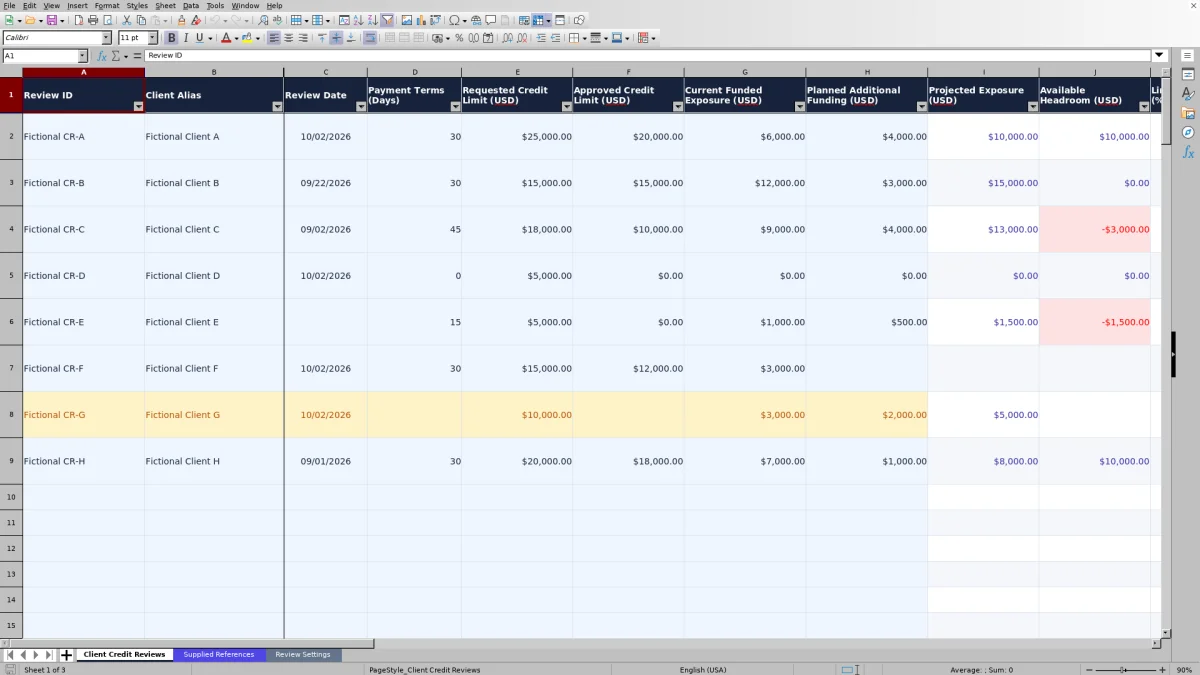
On Client Credit Reviews, enter a unique Review ID, client alias and review date. Record payment terms in whole days and limits and funding amounts in USD. Use the pale blue input cells, leaving the formula cells intact. Enter the approved limit separately from the requested limit, and use zero only when the amount is known to be zero.
3. Add the supplied references
On Supplied References, select the matching Review ID and enter the reference business alias, date supplied, reported terms and supplied payment experience. Attribute the information to its source rather than presenting it as verified. Dates display as MM/DD/YYYY.
4. Check the results and record your decision
Recalculate the workbook in Excel or LibreOffice, then review projected exposure, available headroom and the three status fields. Investigate missing information and exceptions before selecting Pending, Approved, Hold or Declined in Internal Decision. Enter your reviewer alias and use Review Notes to explain the decision and any follow-up you plan to perform manually.
Define funding exposure before comparing it with a limit
Start with cash your agency has already advanced and has not recovered through receipts. Enter that manually reconciled amount as Current Funded Exposure (USD). It is not an invoice balance. Then enter the incremental estimated cash needed for the proposed work as Planned Additional Funding (USD), excluding anything already counted in current exposure.
The worksheet adds those two amounts to calculate Projected Exposure. It subtracts projected exposure from the approved limit to show Available Headroom, and divides projected exposure by the approved limit to show Limit Utilization. These results describe the position under your entered assumptions; they do not calculate assignment hours, payroll or client billing.
Use a consistent reconciliation date and document the basis of your estimate in Review Notes. If the planned funding changes before you accept an assignment, update the estimate and review the results again. Do not combine invoice totals with cash advances or count the same funding in both exposure inputs.
Example: available headroom, a full limit and an over-limit plan
The fictional Client A review has a requested limit of $25,000 but an approved limit of $20,000. Current funded exposure of $6,000 plus planned funding of $4,000 produces $10,000 of projected exposure. Available headroom is $20,000 − $10,000 = $10,000, and utilization is $10,000 ÷ $20,000 = 50.0%. The requested amount does not enter those calculations.
That result means the entered plan fits within the approved limit with $10,000 remaining. It does not mean the workbook has approved the client or confirmed that all costs have been included. Check the funding estimate, supplied information and internal decision before proceeding.
The fictional Client B review illustrates a different boundary: $12,000 already funded plus $3,000 planned equals its $15,000 approved limit. The status is Within Limit, but zero headroom is not spare capacity. Client C has $13,000 projected against a $10,000 limit, producing negative $3,000 headroom, 130.0% utilization and Over Limit. Review that shortfall through your internal process rather than treating a larger requested limit as approval.
Read reference counts as record completeness, not credit quality
A reference contributes to Supplied Reference Count when its Review ID matches the review, its business alias is nonblank and its Date Supplied contains a positive numeric date value. The count does not require reported payment terms or payment experience to be filled in, and it does not evaluate what the reference says.
Reference Count Met is a quantity check, not a recommendation. A report of late payments can meet the count threshold just as a favorable report can. Read the supplied experience and consider it separately when recording your decision.
Multiple reference rows can share a Review ID, but the formula counts qualifying rows rather than distinct businesses. Check for accidental duplicate reference entries. Keep primary Review IDs unique so one set of references is not attributed to multiple review snapshots, and check linked records if you change an ID.
Use review dates to plan manual follow-up
Review By is the entered Review Date plus the interval in Review Settings, measured in calendar days. For example, a review dated 10/02/2026 with a 30-day interval is due on 11/01/2026. This timing is separate from the client's payment terms.
Review Status compares that due date with TODAY() when the spreadsheet recalculates. It shows Overdue before the current date, Due Today on the current date and Current after it. An identified review with no review date shows Missing Review Date. The fictional notes describe demonstration scenarios; the calculated status can change as time passes.
Filter the review list to identify items for follow-up, then contact the appropriate person through your normal process. No reminders are sent. The interval setting applies to all prepared review formulas, so changing it changes existing Review By results too. Save a dated copy first if you need to preserve the previous timing assumptions.
Errors and problems to resolve before relying on a result
If projected exposure is blank, check the Review ID and both funding inputs. Both amounts must be numeric before the total appears. A blank approved limit or an incomplete exposure calculation produces an Incomplete limit status. Do not replace an unknown amount with zero merely to obtain a result.
If a reference does not count, check its linked Review ID, business alias and date. If references appear against the wrong review, resolve duplicate primary IDs and confirm the reference links. The workbook includes duplicate-ID validation and highlighting, but those checks are not a substitute for inspecting imported or pasted records.
Entry validation rejects negative amounts, invalid dates and invalid whole-day inputs. Pasting can bypass validation, so review pasted values manually, especially dates stored as text and amounts that are not numeric. Red and amber formatting draws attention to exceptions; read the status text and underlying inputs rather than relying only on color.
When clearing examples or correcting a record, preserve the calculated cells in columns I–L and O–R on Client Credit Reviews. Overwriting a formula can leave a plausible-looking number that no longer responds to changes in the inputs.
Keep the internal decision separate from formula flags
Internal Decision is a manual selection: Pending, Approved, Hold or Declined. The workbook does not derive it from the exposure or reference results. An Approved selection does not change the approved-limit amount, and an Over Limit result does not automatically change the decision.
Likewise, Within Limit only means the entered projected exposure is no greater than the entered approved limit. It does not establish that supplied references are reliable, that payment terms are appropriate or that the client will pay. Review the separate timing, limit and reference statuses together rather than treating any one flag as a complete approval.
A suggested workflow is to record the reason for a hold or approval in Review Notes and identify the responsible person using Reviewer Alias. Those are entries you maintain, not evidence of an independent review service. The file does not authorize assignments, payments or payroll, and it has no external connections or payment-processing functions.
Comparison: this workbook or a blank spreadsheet
This workbook fits a manual review process where you want prepared calculations and a consistent place to record funding assumptions and supplied references. A blank spreadsheet can fit an agency with a different review structure or a policy model it intends to build itself. The choice depends on whether these calculations match your process, not on a claim that one method establishes creditworthiness.
| Method | Setup | Exposure checks | References and timing | Best fit and limits |
|---|---|---|---|---|
| This workbook | Prepared inputs, formulas, validation and fictional examples to replace. | Calculates projected exposure, headroom, utilization and limit status. | Counts linked supplied records and calculates review dates from a shared interval. | Fits the documented manual review model; prepared ranges contain 100 rows for each record type. |
| Blank spreadsheet | You choose the structure and build any checks you need. | Requires your own formulas or manual calculations. | Requires your own linkage, counting and scheduling approach. | Fits custom requirements when you can build, test and maintain the sheet. |
Neither approach independently verifies reference reports or reconciles your funding balances. If you need system-based approvals, connected financial records or a larger operational workflow, evaluate software against those requirements; this workbook does not provide those functions.
Frequently asked questions
What happens when the approved credit limit is zero?
With zero projected exposure and a zero approved limit, utilization displays 0.0% and the limit status is Within Limit. With positive projected exposure and a zero limit, utilization is blank because there is no valid percentage to display, while the status is Over Limit and headroom is negative. The blank percentage does not mean there is no exposure.
Do payment terms calculate the amount of funding needed?
No. Payment Terms (Days) records the client's terms, and each reference can have its own reported terms. These fields do not drive the funding calculations. You must estimate Planned Additional Funding separately using the relevant cash needs and timing for your agency.
Can I keep multiple reviews for the same client?
Yes. Use a unique Review ID for each snapshot and link its supplied reference records to that ID. The client alias can identify the same client across reviews. This is a manual recordkeeping approach, not automatic version history; preserve a dated file copy when you need a fixed record of previous inputs and results.
Can I add more than 100 reviews or references?
The prepared ranges run from rows 2–101 on both record sheets. Reference-count formulas and the reference ID list also point to those fixed ranges. Do not assume typing below row 101 extends the workbook's functions. Expansion would require updating and checking formulas, validation, filtering and formatting.
Why might a file preview not show calculated results?
The workbook contains formulas but no cached spreadsheet-engine calculation results. Open it in Excel or LibreOffice and recalculate before interpreting the outputs. It is configured to recalculate in those applications, but you should still check the results, including date-based statuses, before using them for a decision.
Editorial contributors

Miriam HaldenRecruiting & assignment workflows
Explore this editorial focus →
Wesley CorbinBilling & agency finance
Explore this editorial focus →